
Morgan & Morgan Mobile
Morgan & Morgan PLLCBusiness
4.9429.00 Reviews
- Version
- 4.31.1
- Installs
- 100.00K
- Age Rating
- Teen
Screenshots
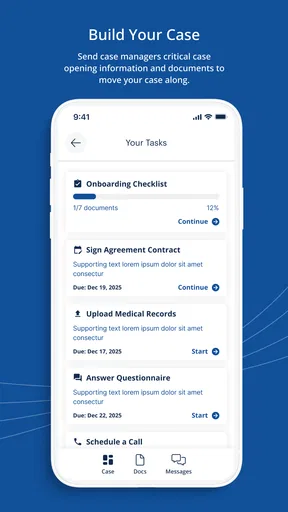
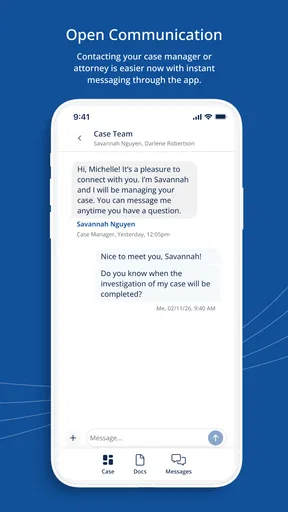
Our Review of Morgan & Morgan Mobile
 Analysis by Appyee
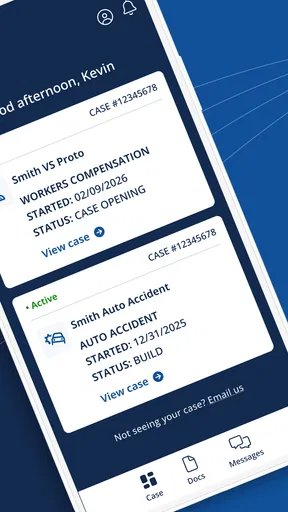
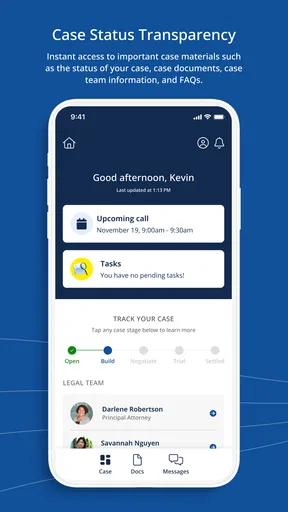
When I opened Morgan & Morgan Mobile, I immediately understood its purpose: it is a focused business app for people who already have a Morgan & Morgan case and want to check its progress without relying entirely on a phone call. The store summary is simple, but that simplicity is also the point. This is not a general legal-information tool, a document editor, or a replacement for speaking with a lawyer. It is a mobile window into an existing case relationship.
I think that distinction matters before downloading it. If you are waiting for updates about a personal legal matter, a dedicated case-status app can feel much more convenient than searching through email, calling an office, or trying to remember which message contained the latest information. If you are only looking for general legal advice, however, this is probably not the right place to start. Its value depends on having a Morgan & Morgan case connection to check.
How Morgan & Morgan Mobile fits into everyday household use
The most realistic use I found is a shared household where one person is the actual client and another person helps with practical organization. Imagine someone recovering from an accident who asks a partner to look at the phone while they are resting, or an adult child helping a parent keep track of a case. In that situation, the app can make coordination easier because the case information is available in a mobile setting rather than being tied to one person’s memory or a stack of paperwork.
That convenience should not be confused with shared ownership. A household may share a phone, a tablet, or responsibility for reminders, but the legal case itself belongs to the client relationship. I would treat the app as a personal account tool first and a household coordination aid second. The person who owns the case should remain the person making decisions about what is shared and who is allowed to see it.
This is especially important in homes where several people use the same device. A quick switch between apps can expose sensitive case details to someone who did not intend to view them. I would avoid leaving the app open on a table or handing over an unlocked phone without checking what is visible. The app’s usefulness comes from access to relevant information, and that same usefulness means it deserves the same care as private legal correspondence.
A practical routine is to use it during a short weekly check-in. The client can review the current case information, tell a trusted household member what action is needed, and then close the app. That is more sensible than repeatedly checking throughout the day or asking several relatives to monitor the same matter. It keeps the app in its proper role: a convenient status check, not a substitute for a family discussion or legal consultation.
What the app is good at for an existing client
The strongest benefit is concentration. Instead of treating case progress as something scattered across calls, messages, and paper notes, the app gives the client a place to begin. I like that its purpose is narrow enough to be understandable. Someone who is stressed about an ongoing case does not need another complicated productivity system; they need a clear way to see whether there is an update worth acting on.
That narrow focus also makes it easier to decide when to use the app. I would open it before contacting the office about a routine status question. If the information already answers that question, I save time. If it shows that I need clarification, I can make a more informed call rather than starting from zero. The app therefore works best as a first check before direct communication.
There is also a useful difference between checking status and trying to manage every part of a case. I would not assume that seeing a status update means every legal or administrative task is complete. A status screen can tell me where things stand, but it does not replace reading a request carefully, meeting a deadline, or asking a qualified representative what a development means. That is an important boundary for any legal app.
For a client who is comfortable with smartphones, the mobile format should be more convenient than relying only on a desktop browser. It is easier to check while away from home, during a planned household conversation, or after receiving a reminder to review the case. Still, convenience is not the same as completeness. I would use it for a quick overview and then follow the instructions attached to the case through the appropriate channel.
Setting up a sensible boundary on a shared device
Before using the app on a family tablet or shared phone, I would decide whose account is being used and who is permitted to handle the device. That sounds obvious, but legal information can become confusing when multiple people sign in to services on the same hardware. A household should not treat the app like a shared shopping list where anyone can casually open it.
My preferred arrangement would be for the client to use their own device whenever possible. If that is not practical, I would make the check-in deliberate: the client opens the app, reviews the information, and closes it before passing the device to someone else. I would also avoid saving screenshots or copying case details into a family group chat unless the client has consciously decided that this is appropriate.
Another useful habit is separating coordination from interpretation. A partner might help remember that a status was checked or that a question needs to be asked. That person should not automatically interpret legal language or promise another family member that a particular outcome is coming. The app can support organization, but it cannot turn a helper into a legal adviser.
I also would not install it on a device used by children simply because the device is available. The content rating is Teen, which is a clear reminder that this is not designed as a child-oriented household app. A teenager might encounter it in a shared-device situation, but the case information should remain under the control of the adult client and trusted adults involved in the matter.
These boundaries are not a criticism of the app itself. They are a practical response to the kind of information it handles. The more personal the case, the more carefully I would manage the device, the account, and the conversation around it.
Coordinating without turning the app into a group workspace
One of the more useful ways to think about Morgan & Morgan Mobile is as a coordination trigger rather than a household collaboration platform. I can check the case, identify whether there is something to discuss, and then speak directly with the client or the firm. That is different from expecting every relative to have access or expecting the app to organize a whole family’s responsibilities.
For example, a spouse might ask, “Has anything changed?” The client can check the app and respond with the current status instead of relying on memory. If the update is unclear, the client can write down a specific question before contacting the firm. This small step can make a conversation more efficient because it turns vague worry into a concrete request.
I would keep a simple offline note of questions, dates, and actions that the client personally needs to remember, while treating the app as the place to check the case itself. That approach reduces the temptation to use chat messages as a permanent legal record. It also helps when a household member is assisting but should not have unrestricted access to the account.
There is a trade-off here. A dedicated app may be faster than calling for every routine update, but a phone conversation can provide context that a brief status display cannot. If the case has changed in a way that affects decisions, I would not stop at reading the screen. I would contact the appropriate Morgan & Morgan representative and ask what the update means for the client’s next step.
This is where the app compares favorably with ordinary alternatives, but only within a narrow lane. Email can be useful for preserving a written conversation, and a phone call is better for nuance. A browser-based account may be preferable on a larger screen when reviewing lengthy information. Morgan & Morgan Mobile is more appealing when the immediate need is a quick, mobile case check rather than a long review or a detailed discussion.
Age, trust, and the person who should control access
The Teen content rating deserves attention because it places the app in a mature context without making it an adults-only product. I would interpret that as a reason for sensible supervision on a shared family device, not as an invitation to let younger household members manage a legal case. The person using the app should understand that the information may be private and that status updates can have real consequences.
Trust is more important than technical convenience in this setting. A client may want help from a spouse, parent, or adult child, but assistance should be agreed upon rather than assumed. I would not let a helper sign in merely because they are curious, and I would not use someone else’s account to look up information without the client’s permission. A shared household does not automatically mean shared legal access.
This also affects notifications and casual conversations. If a device is visible to several people, a message or on-screen detail could reveal more than the client intended. I would review how the phone is used around the household and choose a private moment for checking the case. The important principle is simple: convenience should never outrank the client’s control over sensitive information.
For older adults or people who are less comfortable with apps, the best arrangement may be guided use. A trusted person can sit with the client while the client remains the account holder and decision-maker. This gives the household the benefit of digital access without quietly transferring responsibility to the helper. It also creates a natural opportunity to confirm that everyone understands which questions still need to go to the legal team.
On the other hand, a user who wants a shared family dashboard, broad permission controls, or a place for several people to manage tasks may find this app too limited in concept. I would choose a separate household organizer for general reminders and keep this app reserved for the case itself. Mixing those purposes can make private information harder to control and ordinary family planning more confusing.
What the current app details suggest about fit
Morgan & Morgan Mobile is free, which removes the financial barrier to trying it when you already have a relevant case. It is listed for Android devices running version 7.0 or later, so many older compatible phones can potentially use it. The current version is 4.31.1, and the app has passed the early experimental stage: it has more than one hundred thousand installs and an average rating of 4.9 from around 4.7 thousand ratings.
Those figures make it look well established among the people who choose to use it, but I would still judge it by fit rather than popularity. A high rating does not make it useful to someone without a Morgan & Morgan case. Likewise, free access does not mean the app can answer every legal question. Its usefulness is tied to the client relationship and to how much of the case the user wants to check from a phone.
The developer is Morgan & Morgan PLLC, which makes the app’s identity straightforward. That is reassuring for a client who wants the official mobile experience associated with the firm, but it also reinforces the need to distinguish the app from independent legal research. I would not use it as a general source for comparing attorneys, understanding every possible legal option, or replacing advice from a professional who knows the details of the case.
The release date is May 5, 2022, and the app’s continued version updates suggest an ongoing product rather than a one-off download. Even so, I would keep the usual mobile-app habits: install it from the legitimate app marketplace, keep the operating system reasonably current, and make sure the client knows which account is being used. Those steps are especially worthwhile when the app is connected to personal legal information.
Small habits that make the experience more useful
My first tip is to check the app with a question in mind. “Has the case changed?” is a reasonable starting point, but “Is there something I need to respond to?” is more actionable. This keeps the visit short and helps the client recognize when a status update calls for direct follow-up rather than passive reading.
My second tip is to avoid treating a status label as a prediction. Legal cases can move through stages that are not obvious to someone outside the profession. I would record the wording accurately, then ask the firm to explain anything that affects a decision. That habit prevents a household member from turning a neutral update into an overly optimistic or alarming conclusion.
My third tip is to create a private coordination routine. The client can check the app alone, then share only the practical information a helper needs, such as whether a question should be raised or whether a conversation with the firm is necessary. This is safer than giving several people casual access just so they can stay informed.
A fourth useful trade-off is deciding between mobile convenience and a larger screen. For a quick check while away from home, the app is the natural choice. For reviewing a complicated matter with documents, notes, or several questions, I would move to a more suitable channel and speak with the legal team. The app should reduce friction, not force every task into a phone-sized interface.
Finally, I would not uninstall it simply because there is no new status on one visit. Case progress is not always constant, and the app’s role is to make checking easier, not to guarantee frequent changes. A calm, scheduled review is more useful than repeated checking driven by anxiety.
Who should use it and who should skip it
I would recommend Morgan & Morgan Mobile to an existing Morgan & Morgan client who wants a convenient way to check case status from an Android phone. It is also a sensible option for a household where a trusted adult helps with organization, provided the client remains in control of access and decisions. The free price and straightforward purpose make it easy to try without committing to another paid service.
I would be more cautious about recommending it to someone who expects complete case management, detailed legal explanations, or a shared workspace for relatives. Those needs call for direct communication with the firm or separate tools. I would also skip it as a first download if I were only researching a possible claim, because a case-status app is not the same thing as an intake guide or general legal reference.
Compared with calling every time, the app is faster for a basic check. Compared with email, it may be more convenient for seeing the current case view, while email can remain better for preserving a detailed exchange. Compared with a desktop portal, the mobile format wins for quick access but may be less comfortable for extended reading. In my experience, the best setup is not choosing one channel forever; it is using the app for status and the appropriate human or written channel for meaning, decisions, and clarification.
My household verdict
I came away seeing Morgan & Morgan Mobile as a useful, deliberately focused companion for an existing case. Its strongest quality is not a long list of extras; it is the ability to put a case check within easy reach when a client needs a quick update. That can reduce unnecessary calls and help a household coordinate around facts instead of guesses.
The limits are equally clear. It should not become a shared family account, a replacement for legal advice, or a place where helpers make decisions on the client’s behalf. The Teen rating and the private nature of case information make thoughtful device use important, especially in homes with shared phones or tablets.
If I were recommending it to a friend, I would say this: download it if you are already working with Morgan & Morgan and want a mobile way to follow your case. Use it privately, check it with a specific purpose, and contact the firm when an update needs explanation. For that particular job, the app is practical, free, and easy to justify; for broader legal research or household task management, I would choose a different tool.
Verdict
Strengths of Morgan & Morgan Mobile
- Free access to legal information and case-related resources.
- Simple interface makes it easy to find firm contact options.
- Convenient way to request a consultation from your mobile device.
- Helpful updates can keep clients informed about their case status.
- Supports quick communication without needing to visit an office.
Limitations of Morgan & Morgan Mobile
- Availability of features may vary depending on your case and location.
- Some services may require submitting detailed personal information.
- The app is mainly useful to existing or prospective firm clients.
- Response times may depend on attorney availability and case volume.
- Not a substitute for personalized legal advice from a qualified attorney.
Similar Picks in This Category
View All
LinkedIn: Community & Network
LinkedIn3.8

Zoom Workplace
zoom.com4.1

Microsoft Teams
Microsoft Corporation4.6

Meta Business Suite
Meta Platforms, Inc.4.6

Webex Meetings
Cisco Systems, Inc.4.5

TeamViewer Remote Control
TeamViewer4.4
Frequently Asked Questions
What is Morgan & Morgan Mobile used for?
Morgan & Morgan Mobile is designed to help clients and potential clients interact with the Morgan & Morgan law firm from a smartphone. Depending on your location and case type, you may be able to learn about legal services, request a consultation, submit information about an incident, review communications, and access client-related resources. The exact features available can vary by jurisdiction and by whether you already have an active case.
Can I use the app to start a personal injury claim?
The app may provide a convenient way to contact Morgan & Morgan and share preliminary details about an accident, injury, or another legal matter. However, submitting information through the app does not necessarily mean that the firm has accepted your case or that an attorney-client relationship has been created. A legal professional generally needs to review your circumstances, eligibility, deadlines, and available evidence before explaining the next steps.
Is my personal and legal information secure in Morgan & Morgan Mobile?
Because the app may handle sensitive information, including contact details and descriptions of legal issues, users should review its privacy policy, permissions, and terms before submitting anything. Use a secure internet connection, keep the app updated, and protect your device with a passcode or biometric lock. Avoid entering confidential information on shared devices, and remember that no digital service can guarantee absolute security.
Does Morgan & Morgan Mobile provide legal advice or guarantee representation?
Morgan & Morgan Mobile can offer information and a way to contact the firm, but general content in the app should not be treated as personalized legal advice. Information submitted for an inquiry may require review by the firm before anyone responds. The app also cannot guarantee that Morgan & Morgan will represent you, win your case, or accept every type of claim. For urgent legal questions, speak directly with a qualified attorney.
Is Morgan & Morgan Mobile free, and what devices does it support?
Downloading an official Morgan & Morgan mobile application is generally free, although normal mobile data charges may apply and particular legal services can involve separate agreements or costs. Before installing, confirm that the app is published by the official Morgan & Morgan account and check its current Android or iOS requirements. Availability, features, and supported regions may change, so users should also review the latest store listing.
